

Description
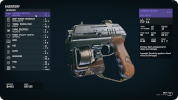
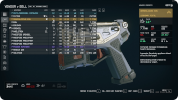
StarUI Inventory improves all inventory screens for use on a PC. Compact display style. More details in sortable columns. Item category icons. Category as left sidebar. Many quality of life features!
Features
- Much compacter overview of category list and item list
- Properties like mass, value, value/mass, mass of stack, value of stack, damage, DPS, damage resistance, ammo type, ammo rounds, weapon type and item rarity are available as column. Only a few are on by default - add as much as you like via INI!
- Sort the list to any of the columns by simply clicking on the column header (toggle asc/desc by another click)
- New special inventory-lookup column OWNED/SHIP/CARGO - See how many items you already have in your backpack/ship when buying or transferring.
- You can temporarily add inactive columns to the interface (lasts until you leave the inventory screen)
- You can fold in in the additional columns to take a look at your item in 3D
- Category icons before the item name, so you can directly see what a item is
- Show all inventories in the bottom panel, including mass and an indicator in which direction you are currently transferring
- Show category summarized mass
- List navigation keys Page-Up, Page-Down, Home and End for fast navigation
- Mass-transfer of a single category from/to container, from/to ship or buy/sell for trading! (Includes options to skip equipped, favorites and specific items)
- Bigger scrollbar, so it's easier to grab it.
- Change the font or font size (If you don't like the ALL UPPERCASE style. I recommend font number 3!)
- Configurable mouse wheel scroll amount of lists
- Option to make <TAB> go directly back to the game instead of the character screen.
- Option to disable the starting and ending animation of inventories
- Multi-language ready with easy translate-able files in the standard format
- Option to show the FormID of an item in the item card in inventory.
- Has no plugins and no quests - Absolutely safe to install and uninstall at any time!
- Doesn't affect the possibility to get achievements
- You can configure all options in the Data\Interface\StarUI Inventory.ini. (Will move to MCM as soon as one is available :) )
Support

m8r98a4f2 also provides support on their Collective Modding Discord channel: m5r Dome | Fallui-Starui-Complex-Sort. A link to the channel and an invite to the server can be found on the Collective Modding resource page.
Additional Resources
Some additional MRC resources from m8r98a4f2:
Updates
2023.09.08 v1.1
Please see the StarUI Inventory Posts tab for a change log.